
Google Ads credits can be a game-changer for your e-commerce business, especially when used effectively on Shopify. In this comprehensive guide, we’ll walk you through how to make the most of your Google Ads credits to drive traffic, increase conversions, and ultimately boost sales on your Shopify store. From setting up your campaigns to optimizing for maximum ROI, this article will equip you with the knowledge and tools you need to succeed in e-commerce advertising with Shopify and Google Ads.
Key Takeaways:
- Shopify Google Ads Credits: Take advantage of the available Google Ads credits offered by Shopify to kickstart your e-commerce advertising efforts.
- Targeted Advertising: Utilize Google Ads to target specific audience segments based on their demographics, interests, and online behavior.
- Optimized Campaigns: Focus on creating well-structured and optimized Google Ads campaigns to maximize your budget and reach potential customers effectively.
- Conversion Tracking: Implement conversion tracking on your Shopify store to measure the success of your Google Ads campaigns and adjust strategies accordingly.
- Continuous Monitoring and Optimization: Regularly monitor the performance of your Google Ads campaigns, analyze data, and make necessary optimizations to improve results and drive more conversions.
What is Google Ads?
Definition and Overview
Any e-commerce entrepreneur looking to increase online visibility and drive traffic to their website should be familiar with Google Ads. Formerly known as Google AdWords, Google Ads is an online advertising platform developed by Google, where advertisers pay to display brief advertisements, service offerings, product listings, video content, and generate mobile application installs within the Google ad network.
Importance of Google Ads in E-commerce
For e-commerce businesses, Google Ads is a powerful tool to attract potential customers actively searching for products or services they offer. With Google Ads, businesses can target specific audiences, set advertising budgets, and track the performance of their ads in real-time. This targeted approach increases the chances of conversion and helps in maximizing the return on investment (ROI).
Overview: E-commerce businesses can leverage Google Ads to reach a broader audience, increase brand visibility, drive website traffic, and ultimately boost sales. By utilizing Google Ads, businesses can stay competitive in the online marketplace and strategically position themselves in front of potential customers searching for products or services they offer.
Understanding the Basics of Google Ads
How Google Ads Works
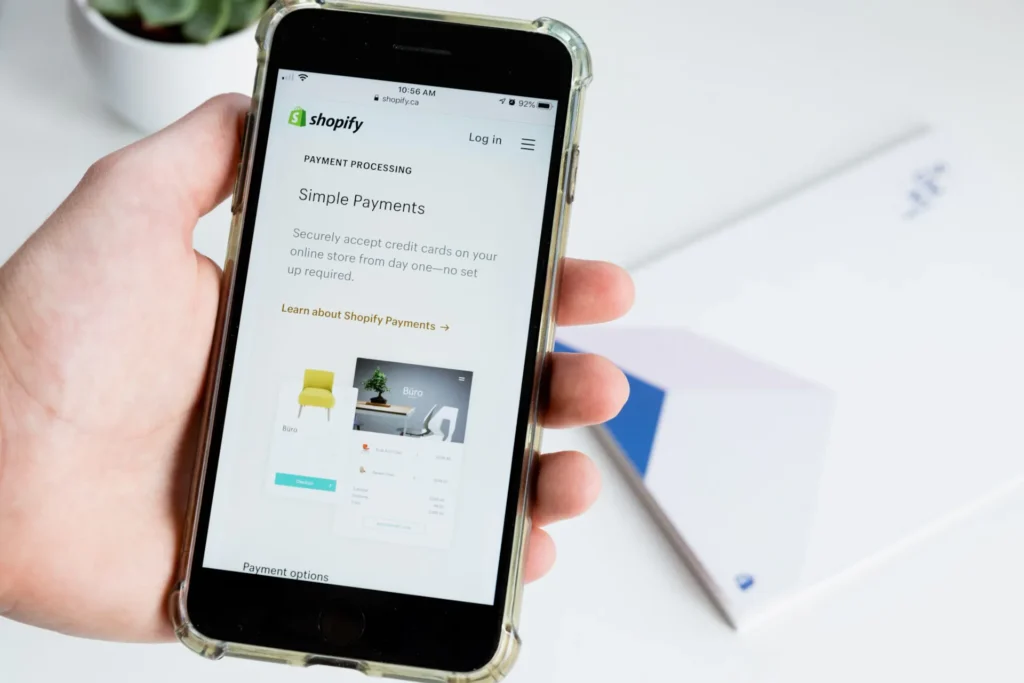
One of the most powerful online advertising platforms available today is Google Ads. This platform allows businesses to create ads that appear on Google’s search engine results pages and other Google properties. Businesses bid on keywords relevant to their target audience, and their ads are displayed to users who search for those keywords.
Key Concepts: CPC, CPM, and CPA
An imperative aspect of Google Ads is understanding key concepts like CPC (Cost Per Click), CPM (Cost Per Thousand Impressions), and CPA (Cost Per Acquisition). CPC refers to the price you pay for each click on your ad, CPM is the cost per thousand impressions, and CPA is the cost per acquisition, which is when a user takes a specific action after clicking on your ad.
It’s crucial to monitor these metrics and optimize your ad campaigns to achieve the best results within your budget. By understanding how CPC, CPM, and CPA work, you can make informed decisions to maximize the impact of your Google Ads campaigns.
Benefits of Using Google Ads for E-commerce Advertising
Increased Visibility and Reach
Despite the competitive landscape of e-commerce, using Google Ads can significantly increase the visibility of your online store. By leveraging Google’s vast reach and targeting capabilities, you can connect with a larger audience interested in your products or services.
Targeted Advertising for Better Conversions
For e-commerce businesses, targeted advertising is necessary for driving better conversion rates. With Google Ads, you can reach potential customers who are actively searching for products similar to yours. By targeting specific keywords, demographics, and interests, you can ensure that your ads are seen by the right audience at the right time.
The precise targeting options offered by Google Ads allow e-commerce businesses to tailor their advertising strategies to reach the most relevant audiences. By focusing on users who are more likely to be interested in your products, you can increase the likelihood of conversion and maximize your advertising ROI.
Setting Up Your Google Ads Campaign
Creating a Google Ads Account
Keep in mind that to start advertising on Google, you’ll need to set up a Google Ads account. This process is relatively straightforward and involves providing basic information such as your email address, business name, and website URL.
Linking Your Shopify Store to Google Ads
Your next step is to link your Shopify store to your Google Ads account. This allows you to track the performance of your ads directly within Shopify, making it easier to monitor conversions, optimize campaigns, and make data-driven decisions to maximize your ROI.
With this integration, you can seamlessly import your product catalog into Google Merchant Center, set up dynamic remarketing campaigns, and leverage Google’s powerful machine learning algorithms to reach potential customers at the right moment with the right products.
Choosing the Right Campaign Type for Your E-commerce Store
Search Ads vs. Display Ads
Many e-commerce store owners often struggle with deciding between Search Ads and Display Ads when setting up their Google Ads campaigns. Search Ads are text-based ads that appear when users search for specific keywords on Google, while Display Ads are image or video-based ads that are shown on websites within the Google Display Network. The choice ultimately depends on your marketing goals and target audience.

Shopping Ads and Their Benefits
One of the most effective campaign types for e-commerce stores is using Shopping Ads on Google. These ads showcase your products directly within the search results, including an image, price, and your store name. Shopping Ads tend to have higher click-through rates and conversion rates compared to traditional text ads. They also allow you to reach users who are already interested in purchasing products similar to yours.
On top of that, Shopping Ads can help you increase your brand’s visibility and attract qualified leads who are more likely to convert into customers. By utilizing product feeds and optimizing your campaigns, you can drive higher-quality traffic to your e-commerce store and boost your overall sales.
Setting a Budget for Your Google Ads Campaign
Determining Your Advertising Budget
Any successful Google Ads campaign starts with setting a realistic budget. Consider your business goals, the cost of your products or services, and the potential return on investment. A good rule of thumb is to allocate a percentage of your revenue towards advertising, typically between 5-10%. Start with a conservative budget and adjust as you monitor the performance of your campaigns.
Bidding Strategies for Cost-Effective Advertising
One of the key factors in optimizing your Google Ads budget is choosing the right bidding strategy. With options such as manual CPC, automated bidding strategies, and target CPA, it’s important to test different approaches to find what works best for your business. Consider your average order value, profit margins, and conversion rates when determining the most cost-effective bidding strategy.
Your bidding strategy will influence how much you pay for each click, so it’s necessary to find the right balance between cost and performance. Monitor your campaigns closely and make adjustments to bidding strategies based on the results you are seeing.
Keyword Research for E-commerce Advertising
Identifying Relevant Keywords for Your E-commerce Store
For e-commerce advertising success, identifying relevant keywords is paramount. Begin by brainstorming potential search terms that align with your products or services. Consider including words related to product type, brand, and unique selling points. Use tools like Google Keyword Planner to expand your list and discover new keyword opportunities based on search volume and competition.

Using Keyword Research Tools for Effective Keyword Selection
One crucial part of effective keyword selection is using keyword research tools. These tools can provide valuable insights into search volume, competition levels, and potential click-through rates for specific keywords. Platforms like SEMrush, Ahrefs, and Moz Keyword Explorer offer comprehensive data to help you make informed decisions when choosing the most impactful keywords for your e-commerce campaigns.
Effective keyword research tools can be a game-changer for your e-commerce advertising efforts. By leveraging these tools, you can uncover high-converting keywords that align with your target audience’s search intent. Additionally, you can identify long-tail keywords that may have lower competition but higher conversion rates, giving your campaigns a competitive edge in the crowded e-commerce landscape.
Creating Compelling Ad Copies
Writing Engaging Ad Headlines and Descriptions
Now, when it comes to writing ad copies for your Shopify Google Ads campaigns, the headline and description play a crucial role in capturing the attention of your potential customers. Craft compelling headlines that are concise, clear, and include a call to action to entice users to click on your ad.
Incorporating Keywords in Your Ad Copies for Better Relevance
Your ad copies should incorporate relevant keywords that align with your products or services. By including targeted keywords in your headlines and descriptions, you can improve the relevance of your ads to the user’s search queries, increasing the chances of your ad being shown to the right audience.
Engaging with relevant keywords not only boosts your ad relevance but also improves your Quality Score, which can lead to lower costs per click and better ad placement on Google’s search results page.
Optimizing Your Campaign for Conversions
Setting Conversion Goals and Tracking Conversions
One of the key steps in optimizing your Shopify Google Ads campaign for conversions is setting clear conversion goals and tracking them effectively. By defining what actions on your website constitute a conversion, such as a purchase or sign-up, you can track the success of your ads in driving these desired actions. Utilize Google Ads conversion tracking tools to measure the effectiveness of your campaigns.
Refining Your Target Audience and Adjusting Ad Campaigns Accordingly
An necessary aspect of optimizing your Google Ads campaign is refining your target audience based on campaign performance data. Analyze metrics such as click-through rates, conversion rates, and cost per acquisition to determine which audience segments are most responsive to your ads. Adjust your ad targeting parameters, such as demographics, interests, and keywords, to focus on high-performing segments and improve your campaign’s overall ROI.
Tracking the performance of your ad campaigns regularly and making data-driven refinements based on audience behavior and engagement levels are crucial for achieving optimal results. By continuously monitoring key metrics and adjusting your targeting strategies accordingly, you can enhance the effectiveness of your Shopify Google Ads campaigns and maximize your conversions.
Utilizing Google Shopping Ads for E-commerce Advertising
Setting Up Google Merchant Center and Syncing Your Product Feed
Not sure where to start with Google Shopping Ads? The first step is setting up your Google Merchant Center account and syncing your product feed. This involves uploading all your products with their relevant details like prices, descriptions, and images.
Optimizing Product Images and Descriptions for Better Performance
Regarding Google Shopping Ads, optimizing your product images and descriptions is key to driving better performance. By ensuring high-quality images and compelling descriptions that include relevant keywords, you can grab the attention of potential customers and drive more clicks to your website.
A well-optimized product feed will increase your chances of showing up in relevant searches and attracting potential customers who are more likely to make a purchase. Make sure your product titles are clear and concise, and that your images are high-resolution and showcase your products in the best light.
Maximizing Return on Investment with Google Ads
Monitoring Campaign Performance with Google Analytics
Performance is key when it comes to running successful Google Ads campaigns. By utilizing Google Analytics, you can gain valuable insights into how your campaigns are performing. Monitor important metrics such as click-through rates, conversion rates, and bounce rates to make data-driven decisions and optimize your advertising strategy for better results.
Adjusting Bids and Budgets for Cost-Effective Advertising
Bids and budgets play a crucial role in the success of your Google Ads campaigns. By constantly monitoring and adjusting your bids based on performance data, you can maximize your advertising budget and ensure that you are getting the most out of every penny spent. Consider reallocating budget towards high-performing keywords or times of the day when your ads perform best to improve your ROI.
With a strategic approach to adjusting bids and budgets, you can optimize your Google Ads campaigns for cost-effective advertising. By regularly analyzing performance metrics and making data-driven decisions, you can fine-tune your campaigns to reach your target audience more effectively and drive higher conversions. Experiment with different bidding strategies and budget allocations to find the optimal balance that delivers the best results for your e-commerce store.
Utilizing Other Google Ads Features for E-commerce Advertising
Exploring Display Ads and Video Ads for Increased Visibility
For e-commerce businesses looking to increase their visibility and reach a broader audience, exploring Google Display Ads and Video Ads can be highly beneficial. Display Ads can help showcase your products or services on relevant websites across the internet, while Video Ads can engage potential customers with visually appealing content on platforms like YouTube.
Leveraging Smart Campaigns and App Campaigns for Mobile Advertising
Increased mobile usage makes it necessary for e-commerce businesses to focus on mobile advertising. Utilizing Google’s Smart Campaigns and App Campaigns can help target mobile users effectively. Smart Campaigns optimize for clicks and conversions, while App Campaigns promote your mobile app across Google’s network, driving app installations and engagement.
Tips and Tricks for Successful E-commerce Advertising on Google Ads
After setting up your Shopify store and receiving Google Ads credits, it’s vital to maximize your e-commerce advertising efforts. Here are some tips and tricks to ensure your Google Ads campaigns generate the best results:
- Focus on relevant keywords and ad copy to attract the right audience.
- Utilize ad extensions to provide additional information and increase visibility.
- Optimize your landing pages for conversion to ensure a seamless user experience.
This will help you drive targeted traffic to your Shopify store and increase your chances of converting leads into customers.
Leveraging Customer Reviews and Social Proofs for Trust Building
Social proof is a powerful tool in e-commerce advertising. Showcase customer reviews and testimonials on your Shopify store to build trust with potential customers. Encourage happy customers to leave reviews and display them prominently on your product pages to influence purchasing decisions.
Implementing Smart Shopping for Automated Campaign Optimization
Reviews suggest that implementing Smart Shopping campaigns can streamline your advertising efforts on Google Ads. By leveraging machine learning and automation, Smart Shopping campaigns optimize your ads based on performance data to reach the right audience at the right time. This can lead to increased conversions and improved ROI on your advertising spend.
Understanding how Smart Shopping works and utilizing its automation features can help you focus on other aspects of your e-commerce business while Google Ads takes care of campaign optimization.
To wrap up
With this in mind, utilizing the Shopify Google Ads credits is a powerful way to kickstart your e-commerce advertising efforts. By following the step-by-step guide outlined in this article, you can effectively create and optimize your Google Ads campaigns to drive traffic and increase sales for your online store. Remember to continuously monitor and adjust your campaigns to ensure maximum ROI. E-commerce advertising doesn’t have to be complicated, and with the right strategies in place, you can see significant growth in your online business.
FAQ
Q: What are Google Ads Credits for Shopify?
A: Google Ads Credits for Shopify are promotional credits provided by Google to Shopify merchants to use towards advertising on the Google Ads platform. These credits can help offset the cost of running ads and drive traffic to your Shopify store.
Q: How can I get Google Ads Credits for my Shopify store?
A: Google Ads Credits for Shopify are available to eligible Shopify merchants who meet certain criteria. You can check your Shopify admin dashboard or reach out to Shopify Support to see if you qualify for these credits.
Q: What can I use Google Ads Credits for?
A: Google Ads Credits can be used to create and run ad campaigns on the Google Ads platform. You can use these credits to promote your products, drive traffic to your Shopify store, and increase your online visibility.
Q: Are there any restrictions on using Google Ads Credits?
A: Google Ads Credits have certain limitations, such as expiry dates and usage guidelines. Make sure to read the terms and conditions associated with the credits to understand how they can be used and any restrictions that may apply.
Q: How can I maximize the impact of Google Ads Credits for my Shopify store?
A: To make the most of your Google Ads Credits, ensure you have a clear advertising strategy in place. Identify your target audience, create compelling ad copy and visuals, and continuously monitor and optimize your campaigns for better results. Additionally, consider working with a digital marketing expert or agency to help you leverage the credits effectively.
Author


Real Wealth: Make Money Work for You
$29.81 (as of November 6, 2026 19:05 GMT +00:00 – More infoProduct prices and availability are accurate as of the date/time indicated and are subject to change. Any price and availability information displayed on [relevant Amazon Site(s), as applicable] at the time of purchase will apply to the purchase of this product.)
The Daily Stoic 10th Anniversary Edition: 366 Meditations on Wisdom, Perseverance, and the Art of Living
$28.49 (as of November 6, 2026 19:05 GMT +00:00 – More infoProduct prices and availability are accurate as of the date/time indicated and are subject to change. Any price and availability information displayed on [relevant Amazon Site(s), as applicable] at the time of purchase will apply to the purchase of this product.)
The 3-Minute Mindset: Choose Your Thoughts. Change Your Life.
$18.98 (as of November 6, 2026 19:05 GMT +00:00 – More infoProduct prices and availability are accurate as of the date/time indicated and are subject to change. Any price and availability information displayed on [relevant Amazon Site(s), as applicable] at the time of purchase will apply to the purchase of this product.)
Atomic Habits: An Easy & Proven Way to Build Good Habits & Break Bad Ones
$15.69 (as of November 6, 2026 19:05 GMT +00:00 – More infoProduct prices and availability are accurate as of the date/time indicated and are subject to change. Any price and availability information displayed on [relevant Amazon Site(s), as applicable] at the time of purchase will apply to the purchase of this product.)


Leave a Reply