
Are you sitting on unused Microsoft Advertising credits, wondering how to maximize their potential? You’re not alone. With the right strategy, you can turn those credits into a powerful marketing tool, driving targeted traffic and boosting conversions. In this guide, we’ll walk you through the steps to capitalize on your Microsoft Advertising credits, from setting up your account to optimizing your campaigns for maximum ROI. By the end of this article, you’ll be equipped with the knowledge to turn your credits into a valuable asset for your business and How to Capitalize on Your Microsoft Advertising (Formerly Bing) Credits.
Key Takeaways:
- Maximize Your Return on Ad Spend (ROAS): To increase your ROAS, get expert help from Lyfe Marketing, which can improve your results and help you stay focused on your business.
- Set Up Your Microsoft Advertising Account Correctly: When setting up your account, enter your email address, name, and birthdate, and verify your email address with a one-time code. Then, answer questions about your business and goals, and specify your target location and time zone.
- Choose Relevant Keyword Themes: Designate the right geographic location for your ads to run, and use keyword themes that relate to your products or services. Avoid overly broad keywords and focus on keywords with high search intent.
- Write Effective Ad Copy: Incorporate highly relevant search keywords in your ad, and include a reason to click through, such as the promise of free shipping. Make sure to input your business phone number to track calls produced from ad campaigns.
- Set a Realistic Budget and Monitor Performance: Set your advertising budget based on the estimated performance of your ad, and calculate how much you need to spend to produce the desired number of conversions. Monitor your campaign’s performance and make adjustments to increase conversions and maximize your ROAS.
Setting Up for Success
Accurately setting up your Microsoft Advertising account is crucial to maximizing your return on ad spend (ROAS) and achieving your advertising goals. In this section, we’ll walk you through the vital steps to set yourself up for success.
1. Set Up a Microsoft Advertising Account
Any business looking to capitalize on Microsoft Advertising credits needs to start by setting up a Microsoft Advertising account. This is a straightforward process that requires you to provide basic information about yourself and your business, including your email address, name, and birthdate. You’ll also need to verify your email address with a one-time code.
Importance of Accurate Account Information
Account accuracy is vital to ensure that your ads are targeted correctly and that you receive the right kind of traffic. When setting up your account, make sure to provide accurate information about your business, including your location, time zone, and advertising goals. This will help you avoid wasting ad spend on irrelevant traffic and ensure that your ads are shown to the right audience.
Account accuracy also plays a critical role in tracking your ad performance and making data-driven decisions. By providing accurate information, you’ll be able to track your ad metrics, identify areas for improvement, and optimize your campaigns for better results.
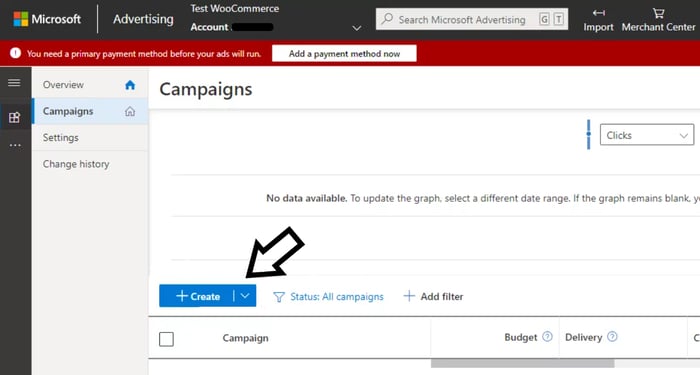
Laying the Foundation
If you want to capitalize on your Microsoft Advertising credits, you need to start with a solid foundation. This means setting up your account, choosing the right keywords, and understanding your target audience.
2. Choose Keyword Themes
Any successful Microsoft Advertising campaign starts with choosing the right keyword themes. These themes allow you to target audiences based on your products or services, increasing the chances of converting them into customers.
Identifying Relevant Keywords for Your Business
Identifying the right keywords for your business is crucial to the success of your Microsoft Advertising campaign. You need to think about what your target audience is searching for and how you can tailor your keywords to match their intent.
Foundation of a successful Microsoft Advertising campaign lies in identifying relevant keywords that resonate with your target audience. By doing so, you can increase the chances of converting them into customers, ultimately driving more revenue for your business.
Tools for Keyword Research
The key to identifying relevant keywords is using the right tools for keyword research. There are many free and paid tools available that can help you find the perfect keywords for your business.
A good keyword research tool can help you identify keywords with high search volume, low competition, and high relevance to your business. Some popular keyword research tools include Semrush, Ahrefs, and Google Keyword Planner. By leveraging these tools, you can create a list of targeted keywords that drive conversions and maximize your return on ad spend.
Crafting Compelling Ads
Unlike traditional forms of advertising, Microsoft Advertising allows you to target specific audiences and tailor your ads to their needs and interests. To craft compelling ads, you need to understand your target audience and create ad copy that resonates with them.
3. Write Your Microsoft Ad
Microsoft-style ad copy should be concise, clear, and relevant to your target audience. Make sure to include your keywords naturally and highlight the benefits of your product or service.
Best Practices for Ad Copywriting
An effective ad copy should be attention-grabbing, informative, and persuasive. Use action-oriented language, focus on the benefits, and include a clear call-to-action (CTA) to drive conversions.
Your ad copy should also be optimized for mobile devices, as more and more users are accessing the internet through their smartphones. Keep your ad copy concise, use short paragraphs, and make sure your CTA is prominent and easily clickable.
Ad Extensions and Their Benefits
Microsoft Ads offers various ad extensions that can enhance your ad copy and improve its performance. These extensions include site links, callouts, and call extensions, among others.
Crafting ad extensions that are relevant to your business and target audience can increase your ad’s visibility, drive more clicks, and improve your conversion rates. For example, adding a call extension can allow users to call your business directly from your ad, making it easier for them to take action.
Budgeting for Success
Now that you’ve set up your Microsoft Advertising account and chosen your keywords, it’s time to think about budgeting for success.
4. Set Your Budget
Budgeting for your Microsoft Advertising campaign is crucial to achieving your desired return on ad spend (ROAS). You can set your daily budget as high or low as you’d like, and Microsoft Ads will estimate how well your ad will perform based on the advertising competition within your industry.
Average Cost of Microsoft Advertising
Success in Microsoft Advertising depends on understanding the average cost of advertising on the platform. Since Microsoft Ads is a pay-per-click (PPC) advertising platform, the price for an ad is based on demand. Popular keywords with high search volumes tend to have higher starting bids, which can drive up your cost-per-click (CPC).
Advertising on Microsoft Ads can be affordable, but it’s necessary to set a realistic budget to achieve your desired ROAS. A single click on an ad could cost pennies or dollars, depending on your industry and target audience.
Factors Affecting Ad Costs
For optimal budgeting, it’s crucial to understand the factors that affect ad costs on Microsoft Ads. These include:
- Keyword competition: Popular keywords with high search volumes tend to have higher starting bids.
- Industry and niche: Certain industries, such as finance and law, tend to have higher CPCs due to high competition.
- Location targeting: Targeting specific locations can affect ad costs, especially if you’re targeting high-cost areas.
- Ad relevance and quality: High-quality ads with relevant keywords and landing pages tend to have lower CPCs.
After considering these factors, you can adjust your budget accordingly to achieve your desired ROAS.
It’s necessary to regularly monitor your ad performance and adjust your budget as needed to optimize your campaign’s success. By understanding the factors that affect ad costs and setting a realistic budget, you can maximize your return on investment and achieve your business goals.
Launching Your Campaign
Once again, you’re one step closer to capitalizing on your Microsoft Advertising credits. Now that you’ve set up your account, chosen your keywords, written your ad copy, and set your budget, it’s time to launch your campaign.
5. Add Payment Info & Go Live With Your Microsoft Ad
Your payment information is required to activate your campaign. Simply add your business name and address information, followed by your payment details. You can only pay by credit or debit card, and you can choose to prepay or postpone payment.
Post-Launch Checklist
Payment processing is complete, and your campaign is now live. Take a moment to review your campaign settings to ensure everything is in order.
This is a critical step in ensuring your campaign’s success. Double-check your keywords, ad copy, budget, and targeting options to avoid any costly mistakes. Verify that your payment information is accurate and up-to-date to prevent any disruptions to your campaign.
Tracking Progress
To effectively capitalize on your Microsoft Advertising credits, it’s crucial to monitor your campaign’s performance regularly. This will help you identify areas of improvement, optimize your ads, and maximize your return on ad spend (ROAS).
6. Monitor the Success of Your Campaigns
Success in Microsoft Advertising depends on your ability to track and analyze your campaign’s performance. By monitoring your campaigns, you can identify which ads are driving conversions, which keywords are generating the most clicks, and where you need to make adjustments to optimize your ROI.
Key Performance Indicators (KPIs) to Watch
KPIs are important metrics that help you measure the success of your Microsoft Advertising campaigns. Some critical KPIs to watch include cost-per-click (CPC), cost-per-conversion (CPA), conversion rate, click-through rate (CTR), and return on ad spend (ROAS).
Tracking these KPIs will give you a clear understanding of how your campaigns are performing and help you make data-driven decisions to optimize your ads for better results.
Ad Analytics and Reporting
An in-depth analysis of your ad analytics and reporting is crucial to understanding your campaign’s performance. Microsoft Advertising provides a range of reporting tools that allow you to track your ad performance, including impressions, clicks, conversions, and cost.
To get the most out of your ad analytics and reporting, take the time to review your reports regularly, identify areas of improvement, and make adjustments to your campaigns accordingly. This will help you optimize your ads for better performance and maximize your ROI.
Optimizing for Better Results
Your Microsoft Advertising campaigns are up and running, but now it’s time to optimize them for better results. This is where the real work begins. Optimization is an ongoing process that requires continuous monitoring, analysis, and improvement. By optimizing your campaigns, you can increase conversions, reduce costs, and maximize your return on ad spend (ROAS).
Identifying Areas for Improvement
For effective optimization, you need to identify areas that require improvement. Analyze your campaign performance data to pinpoint underperforming ad groups, keywords, and ads. Look for metrics such as low click-through rates (CTRs), high cost-per-conversion (CPC), and low conversion rates. These metrics will help you identify areas that need improvement.
Ad Group Optimization Strategies
An vital part of optimization is ad group optimization. This involves structuring your ad groups to ensure that they are relevant, targeted, and aligned with your business goals. By optimizing your ad groups, you can improve ad relevance, increase CTRs, and reduce CPC.
Optimization of ad groups involves creating tightly themed ad groups, using negative keywords to eliminate irrelevant searches, and ensuring that ad copy is highly relevant to the target audience. Additionally, you can use ad group-level bidding to target specific demographics, devices, and locations. By doing so, you can increase conversions and reduce waste.
Bid Management Techniques
An effective bid management strategy is crucial for optimizing your Microsoft Advertising campaigns. This involves setting bids that balance cost with desired outcomes. By using bid management techniques such as cost-per-acquisition (CPA) bidding, return on ad spend (ROAS) bidding, and enhanced cost-per-click (eCPC) bidding, you can optimize your bids for maximum ROI.
To get the most out of your bid management strategy, you need to continuously monitor and adjust your bids based on campaign performance data. This will help you stay competitive, reduce costs, and maximize conversions.
Avoiding Common Mistakes
Many advertisers make mistakes that can cost them valuable time and resources. By being aware of these common pitfalls, you can avoid them and maximize your return on investment (ROI) with Microsoft Advertising.
Common Pitfalls to Watch Out For
On the surface, Microsoft Advertising may seem straightforward, but there are several common mistakes that can hinder your campaign’s performance. These include targeting the wrong audience, using irrelevant keywords, and failing to optimize your ad copy and landing pages.
How to Troubleshoot Ad Issues
Watch out for signs of underperforming ads, such as low click-through rates or high bounce rates. To troubleshoot these issues, review your ad copy, keywords, and targeting settings to identify areas for improvement.
Another crucial step is to analyze your ad metrics regularly, using tools like Microsoft Advertising’s reporting features or third-party analytics software. This will help you identify trends, opportunities, and areas for improvement, allowing you to make data-driven decisions to optimize your campaigns.
Ad Policy Compliance
With Microsoft Advertising, it’s necessary to comply with their ad policies to avoid account suspension or penalties. Make sure you understand their guidelines on content, keywords, and landing pages to ensure your ads meet their requirements.
Policy compliance is critical to maintaining a healthy and successful advertising campaign. By familiarizing yourself with Microsoft Advertising’s policies and guidelines, you can avoid common mistakes and ensure your ads are approved and running smoothly.
Advanced Strategies
Despite having a solid foundation in Microsoft Advertising, there are still ways to optimize your campaigns and maximize your return on ad spend (ROAS). In this section, we’ll probe advanced strategies to take your campaigns to the next level.
Using Microsoft Advertising Scripts
Using Microsoft Advertising scripts allows you to automate repetitive tasks, such as bidding and ad rotation, freeing up more time for strategy and optimization. With scripts, you can create custom rules to manage your campaigns, making it easier to scale and optimize your ads.
| Script Type | Description |
|---|---|
| Bidding Script | Automates bidding strategies based on performance data |
| Ad Rotation Script | Rotates ads based on performance data to optimize ad visibility |
Ad Scheduling and Rotation
Advanced ad scheduling and rotation strategies can help you reach your target audience more effectively. By scheduling ads to run during specific times of the day or week, you can increase conversions and reduce waste.
This strategy is particularly useful for businesses with limited budgets or those targeting specific demographics. For example, if your target audience is working professionals, you may want to schedule ads to run during lunch breaks or after work hours.
| Scheduling Option | Description |
|---|---|
| Dayparting | Schedules ads to run during specific times of the day |
| Weekly Scheduling | Schedules ads to run on specific days of the week |
Targeting Options for Advanced Users
Rotation of targeting options can help you reach your target audience more effectively. By rotating targeting options, you can test different demographics, interests, and behaviors to find the most effective combination.
Another way to optimize targeting is by using custom audiences. Custom audiences allow you to target users based on their behavior, demographics, or interests. This can help you reach users who are more likely to convert.
- Custom Audiences: Target users based on behavior, demographics, or interests
- Lookalike Audiences: Target users similar to your existing customers
- Retargeting: Target users who have interacted with your website or ads
- By implementing these advanced strategies, you can take your Microsoft Advertising campaigns to the next level and maximize your ROAS. Remember to always test and optimize your campaigns regularly to ensure the best possible results.
- Integrating with Other Channels
- All successful marketers know that no single channel is an island. To truly capitalize on your Microsoft Advertising credits, you need to integrate them with other channels to create a cohesive marketing strategy.
- Microsoft Advertising and SEO
- One of the most powerful integrations you can make is with your SEO efforts. By targeting the same keywords in your Microsoft Ads campaigns as you do in your SEO strategy, you can increase your visibility and credibility in search results, driving more traffic and conversions to your site.
- Combining Microsoft Ads with Social Media
- Other channels, like social media, can also be leveraged to amplify your Microsoft Ads campaigns. By targeting the same audiences on social media as you do with your Microsoft Ads, you can create a consistent message and drive more conversions.
- Media platforms like Facebook and LinkedIn offer powerful targeting options that can be used in conjunction with Microsoft Ads to reach your target audience. For example, you can target users who have interacted with your brand on social media with personalized ads on Microsoft’s network, increasing the likelihood of conversion.
- Leveraging Email Marketing with Microsoft Ads
- One of the most effective ways to integrate Microsoft Ads with other channels is through email marketing. By targeting users who have abandoned their shopping carts or haven’t converted yet with personalized ads on Microsoft’s network, you can re-engage them and drive more conversions.
- For instance, you can use email marketing automation tools to trigger Microsoft Ads campaigns based on user behavior, such as cart abandonment or purchase history. This allows you to create a seamless experience across channels and maximize your ROI.
- Measuring ROI and Attribution
- Keep in mind that measuring the return on investment (ROI) of your Microsoft Advertising campaigns is crucial to understanding their effectiveness and making data-driven decisions to optimize them.
- Understanding Attribution Models
- The key to accurately measuring ROI is to understand attribution models, which assign credit to various touchpoints in the customer journey. Microsoft Advertising offers several attribution models, including last click, first click, linear, time decay, and position-based attribution. Each model has its strengths and weaknesses, and choosing the right one depends on your business goals and customer behavior.
- Measuring the Impact of Microsoft Ads on Conversions
- To measure the impact of Microsoft Ads on conversions, you need to track the actions users take on your website, such as form submissions, purchases, or phone calls. Microsoft Advertising provides conversion tracking tools that allow you to set up and track conversions, giving you a clear picture of how your ads are driving desired actions.
- Plus, by setting up conversion tracking, you can also track the revenue generated from your Microsoft Ads campaigns, allowing you to calculate your ROI and make informed decisions about your advertising budget.
- ROI Analysis and Optimization
- Conversions are just one part of the equation; you also need to analyze the ROI of your Microsoft Ads campaigns to ensure you’re getting the best possible return on your investment. By tracking your ROI, you can identify areas for improvement, optimize your campaigns, and allocate your budget more effectively.
- This is where data analysis comes in. By digging into your campaign data, you can identify trends, opportunities, and areas for improvement, and make data-driven decisions to optimize your campaigns and maximize your ROI. With Microsoft Advertising’s reporting tools, you can easily track your ROI and make adjustments to optimize your campaigns for better performance.
- Scaling Your Success
- Not only do you want to capitalize on your Microsoft Advertising credits, but you also want to scale your success to reach more customers and drive more conversions. In this chapter, we’ll explore strategies for growing your campaigns, expanding your reach, and managing multiple accounts.
- Growing Your Microsoft Advertising Campaigns
- Any successful campaign can be scaled up to reach more customers and drive more conversions. To grow your Microsoft Advertising campaigns, focus on optimizing your ad copy, targeting, and bidding strategies to improve performance and increase ROI.
- Strategies for Expanding Your Reach
- To expand your reach, you need to think beyond traditional search ads. Consider targeting new audiences, such as those on Yahoo, AOL, and MSN, which are part of the Microsoft Advertising Network.
- Strategies for expanding your reach include targeting new geographic locations, experimenting with display ads, and leveraging Microsoft’s audience targeting features, such as demographic targeting and custom audiences. By expanding your reach, you can tap into new markets and drive more conversions.
- Managing Multiple Campaigns and Accounts
- Campaigns often have different goals, target audiences, and ad strategies. To manage multiple campaigns and accounts effectively, you need to stay organized and focused.
- This requires setting clear goals and objectives for each campaign, tracking performance regularly, and making data-driven decisions to optimize and improve performance. By managing multiple campaigns and accounts effectively, you can maximize your ROI and drive more conversions.
- Frequently Asked Questions (FAQs)
- For those who are still unsure about how to capitalize on their Microsoft Advertising credits, we’ve got you covered. Below are some frequently asked questions to help you make the most out of your ad spend.
- 1. Is there a free way to advertise with Bing?
- With Bing Places for Business, you can promote your business for free on Bing. Similar to Google Business Profiles, this is a free online business directory listing for local service-based businesses. Creating and managing your Bing Places for Business listing can help your site rank higher in Bing search results, both in search engine results and map placements.
- 2. Which is better: Microsoft Ads or Google Ads?
- On the surface, it seems like Google Ads is the clear winner, given its massive user base. However, Microsoft Ads has its own strengths, particularly when targeting a more affluent and educated audience. Ultimately, the choice between Microsoft Ads and Google Ads depends on your target audience and business goals.
- Bing’s user demographics tend to skew older, more educated, and higher-income, making it an attractive option for businesses catering to this demographic. On the other hand, Google Ads offers a wider reach, making it ideal for businesses looking to cast a broader net.
- 3. Is Bing ads the same as Microsoft ads?
- Advertise with confidence, knowing that Bing Ads is now known as Microsoft Advertising. The steps to advertise on Bing are the same as those discussed above. The Microsoft Advertising Network includes MSN, Yahoo, AOL, and Bing, and search and display ads can appear on those sites as well as third-party websites partnered with Microsoft.
- The rebranding from Bing Ads to Microsoft Advertising reflects the platform’s expanded capabilities and reach. So, whether you’re familiar with Bing Ads or new to Microsoft Advertising, the process remains the same – and we’re here to guide you every step of the way.
- Conclusively, by following these six straightforward steps, you can capitalize on your Microsoft Advertising credits and promote your small business effectively. From setting up an account to monitoring your campaign’s performance, you now have the important knowledge to get started and maximize your return on ad spend. Recall, expert help is always available if you need it, and with the right strategy, you can drive more conversions and grow your business.
Author


The Forever Paycheck: The New Retirement Strategy to Spend More, Worry Less, and Never Run Out of Money
$18.09 (as of October 27, 2026 17:59 GMT +00:00 – More infoProduct prices and availability are accurate as of the date/time indicated and are subject to change. Any price and availability information displayed on [relevant Amazon Site(s), as applicable] at the time of purchase will apply to the purchase of this product.)
Rich Dad Poor Dad: What the Rich Teach Their Kids About Money That the Poor and Middle Class Do Not!
$7.68 (as of October 27, 2026 17:59 GMT +00:00 – More infoProduct prices and availability are accurate as of the date/time indicated and are subject to change. Any price and availability information displayed on [relevant Amazon Site(s), as applicable] at the time of purchase will apply to the purchase of this product.)
Household Cybersecurity: A CPA’s Guide to Protecting Your Accounts and Personal Information (Financial Topics in 100 Pages or Less)
$19.99 (as of October 27, 2026 17:59 GMT +00:00 – More infoProduct prices and availability are accurate as of the date/time indicated and are subject to change. Any price and availability information displayed on [relevant Amazon Site(s), as applicable] at the time of purchase will apply to the purchase of this product.)
The Nerd Reich: Silicon Valley Fascism and the War on Democracy
$18.29 (as of October 27, 2026 17:59 GMT +00:00 – More infoProduct prices and availability are accurate as of the date/time indicated and are subject to change. Any price and availability information displayed on [relevant Amazon Site(s), as applicable] at the time of purchase will apply to the purchase of this product.)


Leave a Reply